
Insights give you a quick summary of reservations for the selected day.
They help you understand how many guests are expected, how busy the day is, and where reservations come from - all at a glance.
To open Insights, click the Reports icon in the bottom-right corner.
When you move between days in the calendar, Insights automatically update to show data for the selected day.
%202025-12-31%20at%2010-22-32%20AM-png.png?width=670&height=527&name=Tablein%20Demo%20restaurant%20(Main%20street)%202025-12-31%20at%2010-22-32%20AM-png.png)
1. Settings
Use Settings to customize your dashboard.
-
Turn off sections you do not need
-
Disable suggestions
Hide dashboards that are not relevant (for example, if you only take phone reservations, you can hide online channels)

2. Total Guests and Reservations
Shows the total number of guests and reservations for the selected day.
-
Cancelled and no-show reservations are not included
-
This number reflects expected arrivals
3. Comparison with Previous Weeks
Shows how this day compares with the same day over the last 3 weeks.
-
Example: If today is Wednesday, it compares with the last 3 Wednesdays
-
Helps you understand if today is busier or quieter than usual
%202025-12-31%20at%2010-50-20%20AM-png.png?width=670&height=172&name=Tablein%20Demo%20restaurant%20(Main%20street)%202025-12-31%20at%2010-50-20%20AM-png.png)
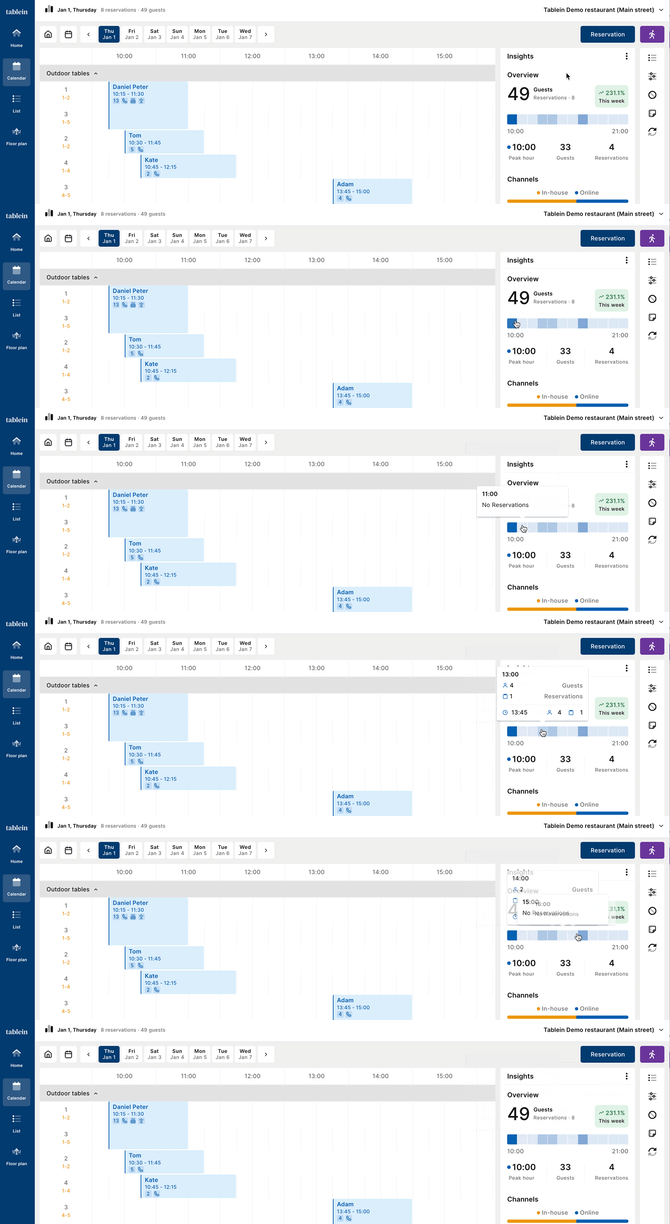
4. Peak Hour and Timeline
Displays the busiest time of the day.
-
Darker colors = busier hours; Lighter colors = quieter hours
-
The peak hour groups all time slots within that hour (for example, 18:00 includes 18:00, 18:15, 18:30, 18:45)
-
Hover over the timeline to see details for each time slot
5. Channels - In-House vs Online
Shows where reservations come from:
-
In-house - phone and walk-ins
-
Online - website, ads, social media, etc.
Below the chart, you can see a breakdown of:
-
Phone reservations
-
Walk-in reservations
6. Online Reservation Sources
Shows which online source guests used to make a reservation:
-
Website
-
Google
-
Instagram
-
Other widgets
Tip: To track sources separately, use different widget links. See the Widget Integration Help Page for setup instructions
%202025-12-31%20at%2010-52-50%20AM-png.png?width=670&height=338&name=Tablein%20Demo%20restaurant%20(Main%20street)%202025-12-31%20at%2010-52-50%20AM-png.png)
7. No-Shows and Cancellations
Shows how many guests and reservations:
-
Arrived
-
Cancelled
-
Did not show up
Displayed in both numbers and percentages, so you can quickly see:
- Cancellation rate
- No-show risk
%202025-12-31%20at%2010-53-56%20AM-png.png?width=670&height=363&name=Tablein%20Demo%20restaurant%20(Main%20street)%202025-12-31%20at%2010-53-56%20AM-png.png)
This dashboard is designed to give you fast insights, help you plan staffing, and prepare for busy periods - without opening individual reservations.